Back up and Restore Active Directory Objects with BUS
From SWCP Support Wiki
Background
The basic idea is you use a script to export the Active Directory Users and Groups objects to a file, then back up that data file with BUS. On restore, you recover the export file, then use import it to Active Directory.
Active Directory Export
- Install the BUS client on the Active Directory server.
- Download the ADuserbackup.zip file from ftp://ftp.swcp.com/pub/bus/ADuserbackup.zip
- Extract and place the files within the ${BUS-Install-Home}\bin directory.
- Create an export directory, for example C:\BackupDir
- Open the BUS client, ceate a file backup set for the AD objects backup.
- Select the export directory C:\BackupDir as Backup Source.
- Accept the default encryption settings if no change is necessary.
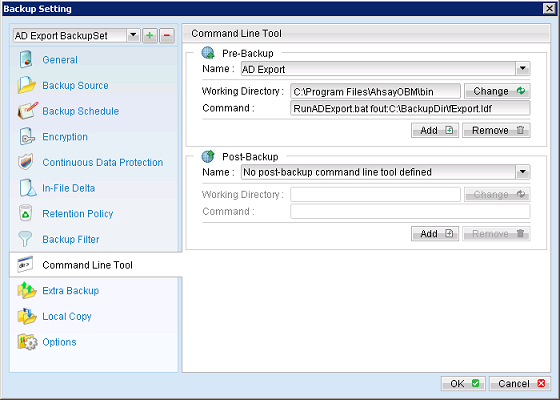
- Select the newly created backup set in the "Backup Settings" menu, select "Command Line Tool"
- Press "Add" under the Pre-Backup section on the right panel, then enter the following entries in the corresponding text fields:
- Working Directory: C:\Program Files\AhsayOBM\bin
- Command: RunADExport.bat fout:C:\BackupDir\fExport.ldf
- Press "OK" to save this setting. media:ADExport2.png